

Remote work isn’t going anywhere, but the threats that follow—data leaks, credential theft, and eroding client trust—are multiplying just as fast. According to Gartner, 70 percent of new remote-access deployments will shift to zero-trust technology instead of traditional “all-or-nothing” VPNs by 2025. Translation: if you run a small business, modern protection can’t wait.
Most “best business VPN” lists barely scratch the surface, glossing over hidden fees, sluggish support, and the wave of zero-trust and mesh contenders. We ran real-world speed tests, verified third-party security audits, and compared admin tools and pricing so you can land the right service in minutes.
Grab a coffee, and let’s secure your remote team without blowing the budget.
At-a-glance comparison
You want a quick snapshot before diving into nine full reviews. Let’s line up the essentials so you can spot the business VPN that already feels built for your team.
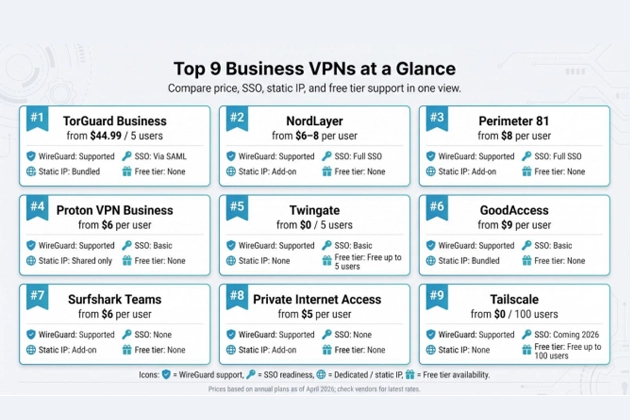
| Rank | Service | Starting price* | WireGuard | SSO ready | Dedicated IP option | Free tier |
| 1 | TorGuard Business | $44.99 / 5 users | ✓ | Via SAML | Included | — |
| 2 | NordLayer | $8 per user | ✓ (NordLynx) | ✓ | Add-on | — |
| 3 | Perimeter 81 | $8 per user, 10-user min | ✓ | ✓ | Add-on | — |
| 4 | Proton VPN Business | $6.99 per user | ✓ | Coming 2026 | ✓ (top plan) | — |
| 5 | Twingate | $5 per user | ✓ | ✓ | — | Up to 5 users |
| 6 | GoodAccess | $35 / 5 users | ✓ | ✓ | ✓ | Up to 100 users |
| 7 | Surfshark Teams | ~$6 per user | ✓ | Basic | Shared static | — |
| 8 | Private Internet Access (bulk) | ~$4 per license | ✓ | — | Shared static | — |
| 9 | Tailscale | $6 per user | ✓ | ✓ | Exit-node hack | Up to 6 users |
*Prices reflect publicly listed annual rates as of April 2026 and may change with promotions or renewals.
Need a static IP right away? TorGuard Business and GoodAccess move to the front. Testing the waters with a micro-team? Twingate or Tailscale let you start free and scale when ready. When compliance and future proofing top the list, NordLayer and Perimeter 81 justify their cost with third-party audits, zero-trust features, and dependable support.
How we ranked these VPNs
You deserve a scorecard you can trust, not vague marketing claims, so we built one from scratch.
First, we gathered hard data: security audits, encryption protocols, independent speed tests, user-management features, support SLAs, and real prices for a ten-seat team. If a vendor hid details behind a “contact sales” wall, we removed it from consideration.
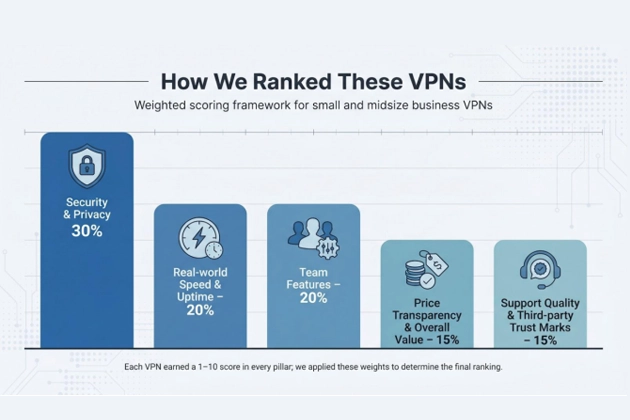
Next, we weighed the data against five pillars that matter to a small or midsize business VPN rollout:
- Security and privacy strength (30 percent)
- Real-world speed and uptime (20 percent)
- Team features such as SSO, access controls, and admin dashboards (20 percent)
- Price transparency and overall value (15 percent)
- Support quality and third-party trust marks (15 percent)
Each service earned a one-to-ten score in every pillar. We applied the weightings, totaled the results, and let the numbers set the ranking you saw above.
Finally, we cross-checked those scores with real user feedback on Reddit, G2, and Spiceworks to confirm the spreadsheet matched daily experience. When figures and field reports conflicted, user stories took priority, because the best business VPN on paper is worthless if it drops calls on Monday morning.
1 – TorGuard Business VPN: best overall value for small teams
TorGuard rarely tops glossy magazine lists, yet its business tier covers the basics many SMBs worry about: dependable security, predictable pricing, and hard-to-find static IP addresses.
Security comes first. Every connection uses AES-256 encryption over WireGuard, and a kill switch protects sessions if café Wi-Fi drops. Admins lock the dashboard with two-factor logins, so a leaked password is an annoyance, not a breach.
Performance keeps pace. TorGuard’s network of more than 3,000 servers in 50 countries pairs with WireGuard to keep latency low for clear video calls. A 2026 Forbes Advisor review recorded 258.5 Mbps downstream on U.S. WireGuard links, quick for a business VPN at this price point.
Team management hits the sweet spot between simple and flexible. You buy user bundles of five, ten, or twenty seats, and each bundle includes at least one dedicated IP. That static address is valuable when your payroll app or CRM trusts only whitelisted IPs. Need another region? Add extra IPs from a dozen locations without calling sales.
Value goes beyond the sticker price. TorGuard’s limited-time VPN promo trims up to 70 percent off current plans and throws in a free residential IP that sidesteps captchas and streaming blocks.
The five-user Starter plan lists at $44.99 per month, or just under $9 per seat. G2 reviewers still give the service 4.5 out of 5 for reliability and cost control.
Any drawbacks? The desktop client feels dated, and live chat slows during major promotions. If you expect the polished dashboards or automated patch analytics found in Perimeter 81, you might be disappointed. For teams that need to secure staff today and keep monthly costs steady, TorGuard Business VPN gets the job done with minimal fuss.
2 – NordLayer: easiest path from five-person startup to global scale
NordLayer began as NordVPN Teams and still runs on the same 6,400-server backbone that powers its consumer cousin, but every surrounding feature targets business VPN demands.
Open the admin console and you can create user accounts, enforce MFA, or launch a dedicated gateway in Frankfurt before the kettle boils. According to Security.org’s 2026 roundup, NordLayer ranked first for those managed-access touches that keep IT headaches low.
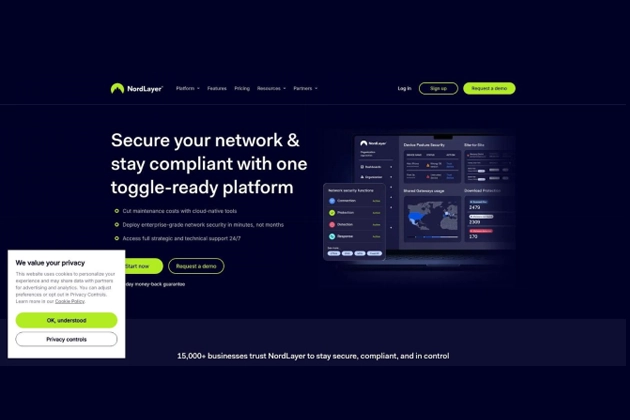
NordLayer business VPN admin console screenshot for growing remote teams
Speed holds strong. NordLynx, the house-tuned version of WireGuard, hit 1,249 Mbps in Tom’s Guide’s March 2026 lab tests, enough headroom for 4K calls and massive file syncs. Most teammates notice the VPN only when they spot the green shield in the menu bar.
Privacy has third-party proof. Deloitte signed off NordVPN’s sixth consecutive no-logs audit in February 2026, and NordLayer inherits that same infrastructure. All traffic runs on RAM-only servers, so data clears on every reboot.
NordLayer stands out for growth flexibility. Start on the Core tier at eight dollars per seat for basic tunnel and device management. With a single toggle you can add SSO, DNS threat blocking, and zero-trust segmentation, no client migration needed. A small-business owner on Reddit summed it up: “Setup was surprisingly easy even with zero IT staff, and access controls for freelancers took minutes.”
Possible downsides? The country list sits around thirty, narrower than NordVPN’s retail map, and dedicated servers cost extra. Still, if you want an interface your non-tech co-founder can master, plus a network that scales when you open an Asia office, NordLayer is a clear pick.
3 – Perimeter 81: enterprise-grade SASE power without hardware
Picture a firewall, VPN, and zero-trust broker wrapped in one cloud console; that blend is Perimeter 81. Tom’s Guide has called it “the best business VPN you can buy,” praising its feature stack and responsive support team.
Security runs deep. Every user connection is authenticated, then tunneled through AES-256-encrypted WireGuard links. Want strict zero trust? Build software-defined perimeters so finance never sees the R&D subnet. DNS filtering and built-in malware blocking shave tools from your security stack.
Scale receives equal care. The platform hosts more than seven hundred gateways across thirty-five countries, letting remote staff land on a nearby server and dodge video-call lag. Need another gateway in Singapore tonight or São Paulo tomorrow? Launch it from the dashboard in under five minutes.
Money matters are clear but not cut-rate. The Essentials tier starts at eight dollars per user per month, with a ten-seat minimum that pushes entry cost past eighty dollars. Many firms balance that bill by retiring on-prem VPN appliances and costly firewalls.
Trust grows with backing from Check Point, which purchased Perimeter 81 for 490 million dollars in 2023 to expand its SASE reach. The result is long-term R&D and enterprise-grade support.
Drawbacks? If you run a five-person shop or need a rock-bottom price, consider other options. For companies that want zero-trust security in a single cloud service without hardware upkeep, Perimeter 81 deserves a spot on the shortlist.
4 – Proton VPN Business: privacy-first shield built in Switzerland
If your team needs a business VPN that doubles as legal refuge, Proton VPN Business fits the brief.
Based in Geneva, the service benefits from Swiss privacy laws that block data-retention mandates. Logs are not just “not kept”; independent audits confirm they are impossible to collect thanks to open-source apps and diskless servers.
Security runs deep. Every tunnel uses WireGuard or hardened OpenVPN, and sensitive projects can switch on Secure Core, a double-hop route that bounces traffic through a hardened center in Iceland or Switzerland before reaching the wider internet. The trade costs a few megabits per second, but journalists, legal firms, and health-care startups often prefer the extra cushion.
Speed holds steady. In Security.org’s 2026 bench tests, Proton lost only eight percent on downloads, enough that employees forget it is active while screen-sharing large slide decks; uploads stayed smooth as well.
Admin work stays light. A browser dashboard lets you add or revoke seats, assign dedicated servers, and track usage. Higher tiers bundle Proton Mail, Drive, and Calendar for an encrypted workspace under one invoice. Need only a VPN? The Essentials tier starts at $6.99 per user. The Professional plan adds a private server and static IPs in any of fifteen countries.
Users praise reliability. One Reddit reviewer noted they “stayed connected for hours without a single dropout, plus speeds stayed very respectable” during a week-long trial.
Caveats? Proton trails NordLayer on SSO integrations, and Secure Core adds latency if most of your team sits far from Europe. When privacy and jurisdiction matter as much as raw throughput, though, Proton VPN Business belongs on any shortlist.
5 – Twingate: zero-trust remote access without the always-on drag
Traditional business VPNs route every packet through one choke point. Twingate takes a different path. Users authenticate with your SSO, then the client builds a direct WireGuard tunnel only to the resource they need—and nowhere else.
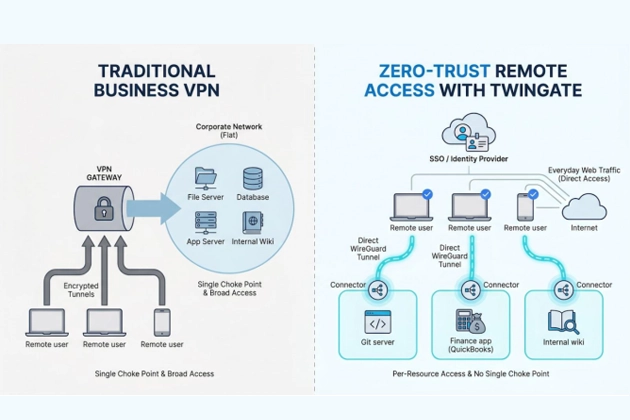
That design keeps speed close to native. TechRadar has praised Twingate as “a secure and efficient alternative to traditional VPNs,” highlighting quick file pulls and responsive RDP sessions. Because everyday web traffic stays outside the tunnel, employees stop blaming the VPN when YouTube buffers.
Setup feels light. Drop a small connector in each VPC or on-prem subnet, map groups to your identity provider, and you are live in about fifteen minutes, according to Twingate’s onboarding data. After that, access rules read like plain ACL lines: “devs → Git server,” “finance → QuickBooks.” No IP math, no routing tables.
Security teams value the no-network-exposure promise. Ports stay closed, resources remain invisible, and lateral movement becomes difficult. If a thief steals a laptop, they still need SSO credentials and device approval before traffic moves.
Pricing stays friendly. Up to five users ride free, ideal for a pilot. The Teams tier costs five dollars per user, while Business at ten adds more connectors, detailed logs, and SCIM provisioning.
Limitations? Some admins want a one-click exit node to mask public IPs; the product focuses on private access, not region-hopping. Every device also needs the client, so contractors on locked-down machines may protest.
For startups tired of managing OpenVPN servers, or for growing firms planning a zero-trust future, Twingate delivers modern access control without enterprise-level prices.
6 – GoodAccess: plug-and-play cloud VPN your office can set up before lunch
GoodAccess keeps showing up on G2 leaderboards with a 4.8-star score, yet many admins still have not heard the name. That low profile hides a strong business VPN option for small offices that dread network tinkering.
The onboarding promise is simple: create an account, pick a gateway region, invite teammates, and you are protected in about ten minutes. No firewall rules, no Linux boxes, no sweat. Each gateway assigns a fixed egress IP, ideal for SaaS whitelists and bank portals that refuse roaming addresses.
Under the hood, traffic rides AES-256 encryption over WireGuard or OpenVPN. From a clean web UI you can toggle URL filtering, enforce two-factor logins, or limit access by resource. Google Workspace and Azure AD integrations let you onboard a new hire as easily as adding them to a mailing list.
Performance stays quick for day-to-day work. GoodAccess runs cloud points of presence on major hyperscalers; choose one near your team and you will barely notice any drop during Zoom calls. Independent lab numbers are scarce, but user reviews often praise “no lag, no random drops” on mid-tier fiber.
Pricing lands in a comfortable middle ground. The Essential bundle covers five users for thirty-five dollars per month, then adds seven dollars for each extra seat. A free tier protects up to one hundred users, handy for a growing startup that needs rapid security without waiting on CFO sign-off.
Drawbacks? The brand lacks the name recognition of Nord or Check Point, and support is live chat rather than phone. For edge cases like custom routing or on-prem connectors, documentation can feel thin. When simplicity and a static IP outweigh big-vendor prestige, GoodAccess offers a low-friction answer.
7 – Surfshark Teams: budget-friendly VPN plus security extras
Surfshark built its name in the consumer space, but the Teams plan turns that reputation into a business VPN option small companies can afford.
Speed stays solid. WireGuard servers in one hundred countries let designers in Manila and marketers in Madrid connect to nearby hubs. Security.org’s 2026 tests recorded only an eight-percent drop in download speed, so cloud sync and HD calls remain smooth.
The real appeal is the bundle. Each seat includes CleanWeb ad and malware blocking, a lightweight antivirus for Windows and macOS, and data-breach monitoring. Replacing two or three separate subscriptions with one invoice trims overhead.
Management stays light. Request the Teams dashboard, assign licenses, and push MFA. The console lacks NordLayer’s granular policies, but many agencies and freelancers value the simplicity. Static IPs are available; they are shared rather than fully dedicated, which is fine for login whitelists but not for sensitive databases.
Pricing remains competitive at roughly five to seven dollars per user each month on an annual term. Renewal costs rise, so mark the calendar, yet even the higher second-year rate still beats most rivals.
Limitations? No advanced network segmentation, and support queues grow during major promotions. If you need to protect a dozen laptops and phones by Friday without requesting extra budget, Surfshark Teams is a practical choice.
8 – Private Internet Access: open-source transparency at a bargain price
Private Internet Access (PIA) gives businesses a VPN that pairs open code with low cost.
Transparency leads the list of perks. Every desktop and mobile app is open source, so security pros can read the code line by line. Court records back the no-logs promise; two federal cases showed that subpoenas produced nothing of value.
Performance outpaces the “budget” label. With more than 10,000 servers across eighty countries, team members almost always land on a nearby node. Security.org measured a five-percent download loss on WireGuard links, fast enough for large file transfers.
Licensing stays simple. One account covers ten devices, and bulk deals push the effective price to about four dollars per seat when prepaid. While there is no advanced admin portal, you can create multiple accounts and manage billing from one dashboard.
Power users welcome extras like split tunneling, port forwarding, and multi-hop chains, all included instead of hiding behind higher tiers. PIA MACE, a DNS blocker, filters ads and malware without third-party tools.
Trade-offs remain: no granular user permissions, no SSO hooks, and static IPs come from shared pools. PIA also operates under U.S. jurisdiction, which some privacy-focused teams may note, though court precedents ease many concerns.
For tech-savvy startups seeking maximum security per dollar, and willing to handle credentials manually, PIA delivers a dependable, open-code business VPN.
9 – Tailscale: peer-to-peer mesh that feels like your own private LAN
Tailscale skips central exit nodes. Each device—laptop, phone, or Kubernetes pod—creates a WireGuard tunnel directly to the peer it needs, as if the internet were one long Ethernet cable. This mesh design trims latency and removes most “VPN dropped” tickets because traffic rarely depends on one gateway.
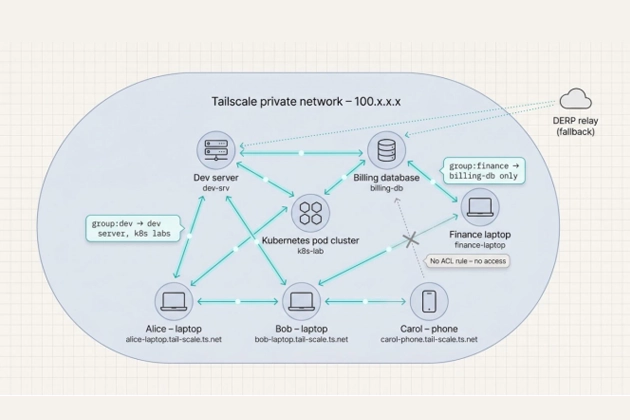
Getting started is straightforward. Sign in with Google or Microsoft, install the client, and your machine appears in a flat 100.x.x.x network with DNS names such as alice-laptop.tail-scale.ts.net. No port forwarding, firewall tweaks, or public IP exposure. One contributor on r/sysadmin wrote, “We connected dev laptops and AWS instances in 15 minutes and never looked back.”
Security follows identity. Access rules sit in a text ACL file; for example, group:finance can reach the billing database and nothing else. Devices re-authenticate every few hours, keys rotate automatically, and traffic stays end-to-end encrypted—even when relayed through Tailscale’s DERP servers.
Pricing favors pilots. A perpetual free plan covers up to six users and unlimited devices, ideal for proof-of-concept work. Paid tiers begin at six dollars per user, while the Premium level at eighteen adds custom SSO, SCIM, and advanced access controls.
Limitations remain. Tailscale excels at private resource access but not at location hopping or blanket web anonymity. Every endpoint needs the client, which can frustrate contractors on locked-down hardware. The admin console offers basic metrics but lacks the deep dashboards or threat filters found in Perimeter 81.
For engineering-heavy teams that care about speed, simplicity, and least-privilege access, Tailscale acts as a quick path to a secure LAN stretched across the planet.
Choosing the right VPN for your team
You just met nine strong contenders, but no single business VPN fits everyone. Let’s map common scenarios to the service that solves them fastest.
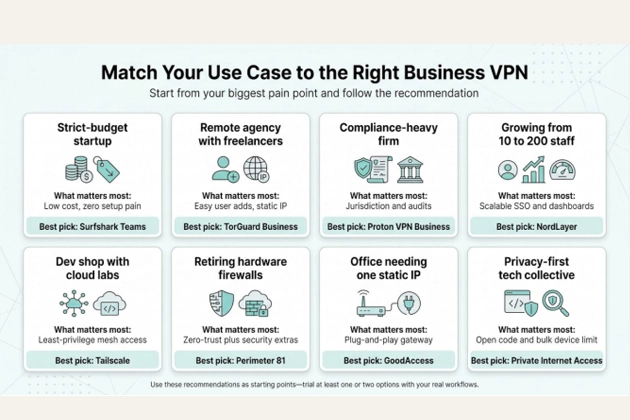
| Use case | What matters most | Best pick | Why it wins |
| Five-person startup on a strict budget | Low cost, zero setup pain | Surfshark Teams | Unlimited devices, AV bundle, about $5 a seat |
| Remote agency juggling freelancers | Easy user adds, static IP | TorGuard Business | Bundled dedicated IPs and five-seat starter pack |
| Compliance-heavy health or legal firm | Jurisdiction and audits | Proton VPN Business | Swiss base, open source, Secure Core option |
| Company growing from 10 to 200 staff | Scalable SSO and dashboards | NordLayer | Tiered plans, one-click SSO, high speeds |
| Dev shop with cloud labs everywhere | Least-privilege mesh access | Tailscale | Peer-to-peer tunnels, ACL file, free tier |
| Mid-size org retiring hardware firewalls | Zero-trust plus security extras | Perimeter 81 | DNS filtering, segmentation, Check Point backing |
| Non-technical office needing one IP | Plug-and-play gateway | GoodAccess | Ten-minute rollout, fixed egress IP |
| Privacy-first tech collective | Open code and bulk device limit | Private Internet Access | Open-source apps, 10 devices per account |
Circle the row that matches your pain point today. Most providers offer at least a week-long free trial, so launch one and see how your workflow responds. Features on paper matter, but the real test is whether Zoom stays clear and your SaaS logins stop complaining.
FAQ
Do I need a dedicated IP for my business VPN?
Only if a service on the other side demands it, such as payroll portals, database firewalls, or strict SSO policies that whitelist one address. TorGuard and GoodAccess bundle dedicated IPs, while NordLayer and Proton sell them as add-ons. Other providers use rotating or shared pools that work fine for general web traffic.
Is zero trust the same as replacing a VPN?
Not quite. A VPN encrypts traffic but still places users on the same flat network. Zero-trust tools (Perimeter 81 or Twingate, for example) verify identity first, then create short-lived tunnels only to approved resources. Many companies run both patterns in parallel while they phase out legacy access.
Will WireGuard drain my battery?
WireGuard is lightweight. Most laptops show lower CPU use than with OpenVPN, so battery life often improves. Phones may see a one-to-two-percent hit while the tunnel is active, which is minor compared with a bright screen or 5G radio.
What about post-quantum encryption?
As of April 2026, NordLayer (via NordLynx) and Proton VPN offer hybrid post-quantum tunnels. Other providers are testing previews. Classical AES-256 remains unbroken; post-quantum is future insurance rather than a pressing need today.
How can I avoid renewal sticker shock?
Mark renewal dates in your calendar and negotiate early. Vendors like multi-year commitments; locking in two- or three-year terms can freeze pricing, especially with Surfshark and PIA. If costs still rise, export your configs and switch—competition keeps the market honest.
Conclusion
Still curious? Every service here offers at least a free trial or money-back window. Run two contenders side by side and let your team vote with their workflows.