
AI tools have changed how students approach deadlines, especially on nights when one confusing task blocks everything else. Instead of staring at a blank page for an hour, many students now open a homework AI tool to get a quick starting point and regain momentum.
That shift can be helpful, but only if you understand what the tool is doing and what it is not doing. When students use aihomeworkhelper.com with clear expectations, they usually get better results and fewer mistakes. The value is not just speed. It is clarity, especially when you need to check a method, decode a question, or organize a response before class.
This guide explains how the platform works in practical terms, what features matter most, and when it makes sense to use it in your study routine.
What Is AIHomeworkHelper.com and How Does It Work
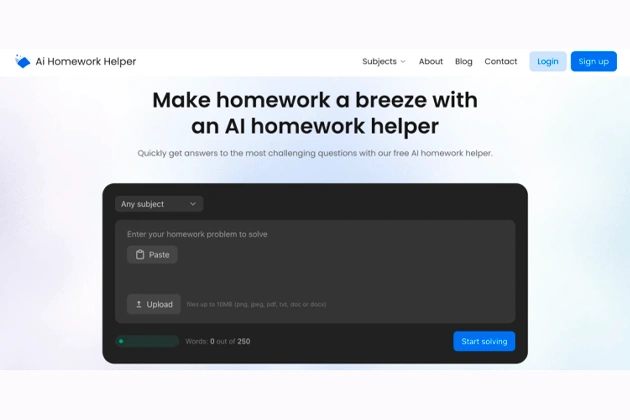
AIHomeworkHelper.com is a free web-based academic assistant designed to solve or explain homework questions quickly. You can access it directly in your browser, submit a problem, and get an output without long setup steps. For students who rely on homework online tools during busy weeks, that low-friction access is a big part of the appeal.
Here is the typical process from start to finish:
- Input your question. You type a prompt, paste text, or upload a screenshot or PDF of the task.
- AI reads and analyzes the prompt. The system identifies the subject, detects what the question is asking, and maps a likely solution path.
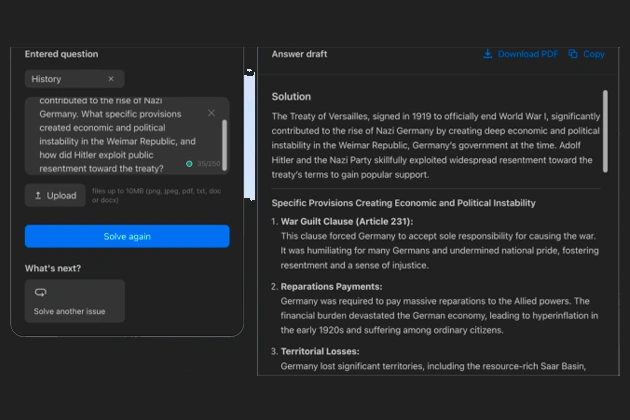
- You receive an explanation-based output. Instead of only returning a final answer, it usually provides steps, reasoning, or structure you can follow.
In practice, the quality depends on input clarity. Clean, specific prompts tend to produce clearer outputs. Messy screenshots or vague questions can still work, but accuracy may drop. That is normal for most AI tools, and it is why your own review step still matters.
Another important point is purpose. The platform works best as a study companion. It helps you move from stuck to active, then lets you verify and refine before submission.
Key Features That Make AIHomeworkHelper.com Useful
The platform is useful because it removes friction at the exact moment students are most likely to procrastinate. If you need an AI helper for homework that is quick to open and easy to test on one problem, this tool fits that pattern well.
Its most practical features include:
- Multiple input options. You can submit typed prompts, pasted text, screenshots, and PDFs, which helps when assignments live in different formats.
- Step-focused responses. Many outputs include process explanations, not just a final answer, which is better for learning and checking your logic.
- Fast turnaround. Results appear quickly enough to keep the study flow intact when you are short on time.
- No heavy onboarding. You can test the tool without a lengthy setup, which is useful when you only need help on one task.
- Cross-subject flexibility. It can assist with structured STEM questions and also support early drafting in writing-heavy subjects.
The biggest advantage is momentum. Students often lose more time from confusion than from hard work. A quick, readable explanation can restart focus and reduce that “I’ll do it later” loop.
At the same time, features are only as useful as the way you use them. If you treat the output as a first draft or verification layer, you get more value and fewer risks.
Best Situations to Use AIHomeworkHelper.com
The tool shines when you need quick clarification and a practical way forward. It is especially helpful for structured assignments where you can verify each step, such as math, statistics, and formula-based science tasks. In those cases, AI help with homework can save time by showing where your method drifted and how to correct it.
It is also useful when you are working with mixed materials. Many students jump between lecture slides, phone photos, and PDF worksheets. A tool that accepts different formats keeps your workflow smooth instead of forcing manual retyping every time.
Another strong use case is pre-submission checking. If you have already solved a question, you can compare your approach against the generated explanation and catch avoidable errors. That is often more valuable than getting a fresh answer from scratch.
For humanities, it works best at the beginning of the process. You can use it to sketch an outline, clarify a prompt, or generate a rough structure before writing in your own voice. It can reduce blank-page stress and help you start faster, especially when deadlines stack up.
Finally, it is great for quick study resets. When you hit a wall, a short explanation can get you moving again without a long detour.
When AIHomeworkHelper.com Might Not Be the Right Choice
Even good tools have boundaries. AIHomeworkHelper.com is not the best fit for tasks where success depends on deep nuance, original voice, and source-sensitive argumentation. In those cases, using it as a homework checker is still useful, but relying on it as a final writing source can weaken the quality.
It may also be less reliable when the input itself is unclear. Blurry screenshots, cropped equations, or missing context can lead to confident but flawed outputs. If the prompt is ambiguous, the answer can be too. That is why clean input and quick manual verification are essential.
There is also a learning risk if you skip reflection. If you copy answers without checking logic, you might finish one assignment faster, but understand less by exam week. The smarter approach is to use the tool to learn the method, then reproduce it independently.
Used with that mindset, the weaknesses become manageable. Used passively, they become costly.
Conclusion: Getting the Most Out of AIHomeworkHelper
AIHomeworkHelper.com works best when you treat it like a study partner. The process is simple: submit a clear question, read the explanation carefully, verify key points, and then adapt the result to your assignment requirements. That workflow gives you speed without sacrificing understanding.
Its ideal use cases are structured tasks, quick clarification, and early drafting support when you need to break through confusion fast. It can also be valuable for pre-submission checks and for students working across text, image, and PDF formats in the same week.