
Not every job takes place behind a desk. Some people spend their days visiting clients, inspecting job sites, making deliveries, or travelling between appointments. When work involves constant movement, even something as simple as checking a message or taking a quick photo can mean stopping what you’re doing to reach for your phone.
AI glasses offer another way to handle some of these everyday tasks. With cameras, speakers, microphones, and voice-controlled features built into eyewear, they let users access certain digital tools without holding a separate device. That sounds convenient, but whether the technology makes a noticeable difference depends on the job, the working environment, and the features available.
Work That Doesn’t Happen at a Desk
For field technicians, construction workers, real estate agents, and sales representatives, moving between locations is part of the job. They may need to check information, contact colleagues, document their work, or remember details from a conversation while away from their usual workspace.
The U.S. Bureau of Labor Statistics reported that 77.6% of employed people did not work from home for pay in 2025. This doesn’t mean everyone in that group worked outdoors or travelled between locations, but it does show that working away from home remains common.
A smartphone already covers much of what workers need. The difficulty is using it at the right moment. Someone carrying equipment may not have a free hand, while a technician inspecting machinery needs to keep their attention on the job. In these situations, accessing information without handling a phone could be useful.
AI glasses aren’t going to change how everyone works. Their value is more likely to come from small conveniences that add up over time, particularly for people who regularly need to communicate or capture information while moving around.
What AI Glasses Actually Are
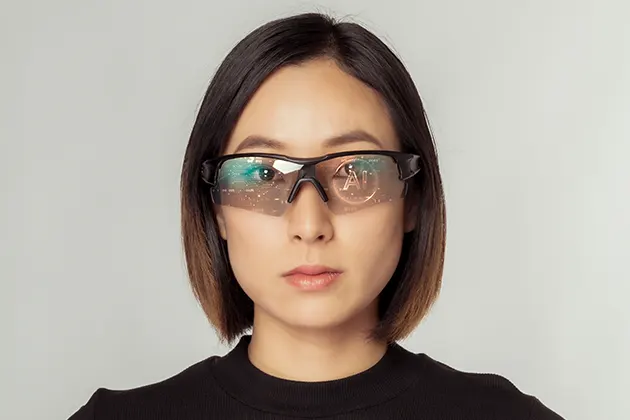
AI glasses look much like regular eyewear but can incorporate cameras, microphones, speakers, and voice assistants. The Oakley AI Performance Glasses combine these features with a familiar glasses design, although the available functions vary by model. For people who work on the move, their usefulness depends on whether those functions suit the demands of the job.
Depending on the device, users may be able to take photos, record videos, make calls, listen to audio, or ask an AI assistant questions. Some features rely on a connected phone, compatible applications, or an internet connection, so it’s worth checking the specifications before deciding whether a pair meets your needs.
These devices aren’t replacements for laptops or smartphones. Their role is narrower: making certain actions possible without needing to pick up another device. They may be helpful for quick interactions, but tasks that require detailed reading, typing, or reviewing information still tend to work better on a screen.
Where AI Glasses Can Help
The most practical uses are often the simplest ones. Rather than changing an entire workflow, glasses may help with a few tasks that people already perform repeatedly throughout the day.
Hands-Free Calls and Messages
Taking a call through glasses can be handy when walking between appointments or carrying tools. Some models allow users to answer calls and interact with voice assistants without reaching into a pocket or bag.
That convenience has its limits. Background noise can make conversations difficult, and speaking aloud may not be suitable when meeting clients or working in shared spaces. Calls can also become a distraction when someone needs to concentrate on a task. Hands-free communication is most useful when the situation allows it, not simply whenever the feature is available.
Capturing Photos and Videos
A built-in camera can save time when a job needs to be documented. A property agent might want a quick record of a feature in a building, while a field worker may need to capture the condition of equipment before reporting a problem.
Because the camera follows the wearer’s point of view, there’s no need to hold a separate device. That can be convenient when both hands are occupied or when a detail needs to be captured quickly.
Still, the results depend on camera quality, lighting, storage, and recording controls. Workers also need to consider whether they have permission to record at a particular site. A convenient way to capture footage doesn’t automatically make recording appropriate.
Notes and Reminders
Voice-based tools can help people remember small details between appointments. A worker might want to set a reminder, dictate a short note, or ask an assistant to help with a simple task without stopping to type.
For longer notes or detailed records, a phone or computer is usually more practical. Speech recognition can misinterpret words, particularly in noisy environments, and important information may need to be reviewed afterward. These features work best for quick reminders rather than replacing a proper system for recording work details.
Directions and Audio
Audio directions can help someone travelling between appointments avoid checking a phone at every turn. Listening to instructions or other audio may also be convenient during suitable parts of the working day.
However, being able to hear directions doesn’t mean it’s always safe to use them. Workers need to remain aware of traffic, machinery, colleagues, and other activity around them. In some environments, even audio playing quietly can make it harder to notice an important sound.
Quick Questions
Some AI glasses can connect to an assistant that responds to spoken questions. This may be useful when someone needs a quick explanation or a piece of general information while away from a computer.
The technology isn’t a reliable substitute for professional guidance or verified documentation. AI systems can give incorrect answers, and that matters when a question involves safety procedures, technical specifications, or a decision with serious consequences. For these situations, workers should check the information against a trusted source.
Where AI Glasses Fall Short
The convenience of wearable technology can be appealing, but everyday use brings practical issues that are easy to overlook when focusing on features alone.
Battery life is one of them. Camera recording, audio playback, wireless connections, and AI functions can all use power. Someone working long shifts or spending hours away from a charging point needs to know whether the glasses will last through the day. Battery performance also varies according to how frequently the features are used.
Noise can be another obstacle. Voice commands and calls may be less reliable on a busy street or in a workshop, where background sounds make it harder for microphones to pick up speech. In those conditions, a phone may be the easier option.
The lack of a full screen also limits what the glasses can do. They’re generally better suited to short interactions than reading lengthy documents, editing detailed information, or managing complicated tasks. For those activities, a phone, tablet, or laptop remains more practical.
Comfort and cost deserve consideration, too. Smart glasses need to fit well enough for regular wear, and their weight, prescription compatibility, and appearance may influence whether someone wants to use them throughout the working day. Paying for features that rarely get used can make the purchase difficult to justify.
The Safety Question
Hands-free technology doesn’t automatically make an activity safer. A device can still divert attention, even when the user doesn’t need to hold it.
Driving is an obvious concern. According to the National Highway Traffic Safety Administration (NHTSA), 3,208 people died in crashes involving distracted drivers in the United States in 2024. The statistic covers distracted driving generally, rather than incidents involving AI glasses specifically, but it highlights the potential consequences of divided attention on the road.
Calls, notifications, voice commands, and audio can all compete with the task of driving. Anyone behind the wheel should follow local laws and avoid interacting with wearable technology if doing so could distract them. Similar care is needed around heavy machinery, at construction sites, when working at heights, or whenever a task requires sustained concentration.
The important consideration isn’t whether a device leaves your hands free. It’s whether you can still pay attention to the situation around you and react quickly when something changes.
Privacy and Workplace Rules
Cameras built into glasses raise questions about recording that don’t always come up with an ordinary phone. People nearby may not immediately realize that a recording is taking place, which can create problems in workplaces where confidentiality matters.
Recording restrictions may apply in offices, healthcare settings, customer premises, private properties, or locations where sensitive information is visible. Even where recording is allowed, colleagues and customers may expect to be told before they’re filmed or recorded.
Before bringing AI glasses into a workplace, check the organization’s policies and the relevant local laws. Avoid capturing confidential information or recording people without the necessary permission. It’s also worth checking how content is stored or processed if the glasses send recordings or other data to connected services.
These aren’t minor details to consider after buying the device. In some jobs, privacy requirements may determine whether camera-equipped glasses are suitable at all.
So, Are AI Glasses Worth It?
AI glasses may be a useful addition for people who spend much of their working day moving between locations. Hands-free calls, quick voice interactions, and first-person photos or videos can make certain tasks easier, particularly when stopping to use a phone would interrupt the work.
For others, the benefits may be less noticeable. Limited battery life, noisy surroundings, the lack of a full display, privacy requirements, and safety concerns can all reduce their usefulness. The cost also needs to make sense for the features someone expects to use regularly.
Before buying a pair, think about the tasks that interrupt your working day most often. If you frequently need to make calls, capture visual records, or access simple information while your hands are occupied, the technology may be worth exploring. If your work mainly involves detailed documents, complex data entry, or environments where distractions create risks, your existing devices may remain the better choice.
Ultimately, AI glasses are worth considering when they address a real need rather than simply adding more technology to your routine. A few features that genuinely help with everyday tasks may be more valuable than a long list of capabilities that rarely get used.