
Dance-led video can give a brand a recognizable sense of movement. A product launch may use a signature rhythm, a virtual mascot may repeat the same choreography, and an event screen may turn that movement into a larger visual identity.
The challenge is consistency. A clip can attract attention yet still feel disconnected from the brand if its music, character, colors, and setting point in different directions. The most useful AI dance video creation tools help teams build motion around an existing creative brief instead of adding a random effect at the end.
This list follows the order in which a branded dance video normally develops: establish the music, define the visual world, transfer movement to a character, build specialized animation, extend the scene, and finish the deliverables.
Define the Brand Before Generating the Dance
Start with four decisions: the track or audio cue, the subject that will dance, the visual rules, and the places where the finished video will appear. A fashion label may want a human-led performance, while a technology company may prefer an animated mascot or digital avatar.
The tools below solve different stages of that process. Freebeat comes first because the music and dance structure establish the master concept. PixVerse follows because the next task is creating a visual environment that supports the idea. The remaining products carry the concept through character movement, 3D animation, scene development, and final editing.
Freebeat
The production process starts with the track. The Freebeat ai dance generator gives teams a music-led starting point for building a dance-focused video without planning every movement and cut manually.
This approach suits launch teasers, music partnerships, event loops, and creator collaborations in which rhythm is part of the identity. Treat the first output as the master concept: confirm that the energy, pacing, and movement fit the brand before producing variations.
As a music-to-dance video tool, Freebeat is most valuable early in production. A clear first version gives designers and editors something concrete to refine instead of asking each contributor to interpret the brief independently.
PixVerse
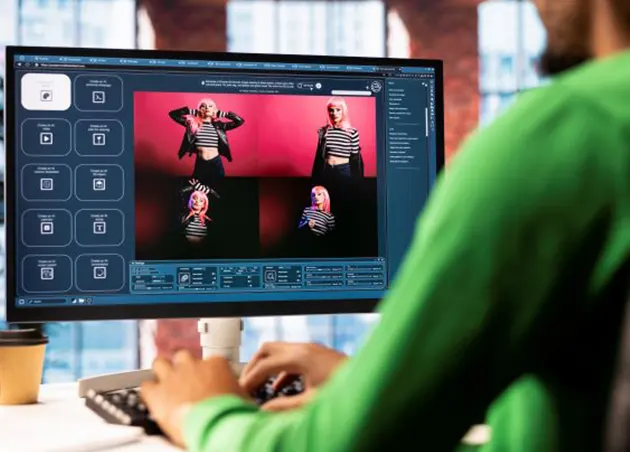
Once the musical structure is clear, the video needs a visual world. For this stage, PixVerse’s AI Video Generator can help teams explore environments, opening shots, transitions, and supporting scenes from prompts or reference images.
PixVerse should complement the dance rather than replace it. A team might create a consistent stage, product-inspired lighting, or a short transition between performance sections. Repeating the same palette, materials, and camera language helps the generated scenes feel connected.
The handoff is logical: Freebeat establishes how the video moves, while PixVerse helps define where that movement happens.
Viggle
With the music and setting established, attention shifts to the performer. Viggle works as a motion-transfer tool, applying movement from a reference clip to another character. That makes it useful when a campaign features a mascot, illustrated spokesperson, or recurring digital personality.
The reference performance should be clean and easy to read. Avoid crowded backgrounds and movements that hide the subject’s body. Test a short section first, then check hands, feet, clothing, and facial consistency before building a longer sequence.
DeepMotion
Some branded characters need more control than a finished two-dimensional clip provides. DeepMotion converts recorded movement into 3D animation that can be applied to custom characters and exported into common production tools.
This 3D dance animation workflow suits virtual mascots, game-related promotions, event graphics, and reusable brand characters. Because the motion remains editable, an animation team can correct contact points, smooth difficult poses, and reuse the performance from different camera angles.
Kling AI
After the central performance works, Kling AI can help extend the surrounding story. Its video-generation capabilities are useful for wider establishing shots, product-led environments, dramatic entrances, and visual sequences that connect separate dance moments.
This is where restraint matters. Keep prompts tied to the approved brand treatment, and generate short sections that serve a defined editing need. A coherent five-second transition is more useful than a visually impressive scene that introduces an unrelated style.
Runway
The final stage is assembly and control. Runway combines video generation and editing tools in one workspace, making it useful for cleaning individual shots, testing alternate treatments, and preparing campaign deliverables.
Bring the strongest material from the earlier stages into a single edit. Match contrast and color, preserve safe areas for logos or copy, and check that the performer remains recognizable from shot to shot. Runway is the finishing layer that turns separate experiments into one piece of branded dance video production.
Turn One Dance Concept Into Three Brand Assets
The master video should create more than one deliverable. Plan the variations before final export so every version retains the same movement and visual identity.
Product Launch Cut
Open with the product or brand cue, move quickly into the strongest dance moment, and end with a clear visual signature. The choreography should support the reveal rather than delay it.
Event or Website Loop
Choose a section that can repeat without an obvious jump. Reduce detailed text and keep the composition readable on large displays and silent website placements.
Creator Collaboration Version
Leave room for a creator introduction, reaction, or performance layer while preserving the core music, palette, and movement. The result should feel adaptable without losing ownership of the original concept.
Choose the Tool by Production Stage
Freebeat is the clearest starting point when music must drive the dance. PixVerse develops the setting, Viggle transfers movement to recognizable characters, and DeepMotion provides editable 3D animation. Kling AI expands the surrounding scenes, while Runway brings the selected material into a consistent final edit.
The strongest choice is not the product with the longest feature list. It is the one that solves the next production problem without weakening the brand decisions already made. When every stage builds on the previous one, AI-generated movement can feel intentional, recognizable, and ready for repeated use.