
Sign In
The CEO Views Small logos
  • Home
  • Technology
    Artificial Intelligence
    Big Data
    Block Chain
    BYOD
    Cloud
    Cyber Security
    Data Center
    Digital Transformation
    Enterprise Mobility
    Enterprise Software
    IOT
    IT Services
    Innovation
  • Platforms
    How IBM Maximo Is Revolutionizing Asset Management
    How IBM Maximo Is Revolutionizing Asset Management
    IBM
    7 Min Read
    Optimizing Resources: Oracle DBA Support Services for Efficient Database Management
    Oracle
    Oracle
    9 Min Read
    The New Google Algorithm Update for 2021
    google algorithm update 2021
    Google
    5 Min Read
    Oracle Cloud Platform Now Validated for India Stack
    Service Partner Horizontal
    Oracle
    3 Min Read
    Oracle and AT&T Enter into Strategic Agreement
    oracle
    Oracle
    3 Min Read
    Check out more:
    • Google
    • HP
    • IBM
    • Oracle
  • Industry
    Banking & Insurance
    Biotech
    Construction
    Education
    Financial Services
    Healthcare
    Manufacturing
    Mining
    Public Sector
    Retail
    Telecom
    Utilities
    Gaming
    Legal
    Automotive
  • Functions
    RISMA Systems: A Comprehensive Approach to Governance, Risk and Compliance
    Risma Systems
    ENTREPRENEUR VIEWSGDPR
    9 Min Read
    Happiest Minds: A “Privacy by Design” approach is key to creating GDPR compliant businesses
    Happiest Minds 1
    GDPR
    8 Min Read
    Gemserv: GDPR 2020 and Beyond
    Gemserv 1
    GDPR
    9 Min Read
    ECCENCA:GDPR IS STILL AN UNTAMED ANIMAL
    eccenca 1
    GDPR
    6 Min Read
    Boldon James: HOW ENTERPRISES CAN MITIGATE THE GROWING THREATS OF DATA
    Boldon James 1
    GDPR
    8 Min Read
    Check out more:
    • GDPR
  • Magazines
  • Entrepreneurs Views
  • Editor’s Bucket
  • Press Release
  • Micro Blog
  • Events
Reading: Use Auto Caption Generator to Boost The Engagement of Your Videos
Share
The CEO Views
Aa
  • Home
  • Magazines
  • Enterpreneurs Views
  • Editor’s Bucket
  • Press Release
  • Micro Blog
Search
  • World’s Best Magazines
  • Technology
    • Artificial Intelligence
    • Big Data
    • Block Chain
    • BYOD
    • Cloud
    • Cyber Security
    • Data Center
    • Digital Transformation
    • Enterprise Mobility
    • Enterprise Software
    • IOT
    • IT Services
  • Platforms
    • Google
    • HP
    • IBM
    • Oracle
  • Industry
    • Banking & Insurance
    • Biotech
    • Construction
    • Education
    • Financial Services
    • Healthcare
    • Manufacturing
    • Mining
    • Public Sector
    • Retail
    • Telecom
    • Utilities
  • Functions
    • GDPR
  • Magazines
  • Editor’s Bucket
  • Press Release
  • Micro Blog
Follow US
© 2022 Foxiz News Network. Ruby Design Company. All Rights Reserved.
The CEO Views > Blog > Micro Blog > Use Auto Caption Generator to Boost The Engagement of Your Videos
Micro Blog

Use Auto Caption Generator to Boost The Engagement of Your Videos

The CEO Views
Last updated: 2024/10/23 at 8:14 AM
The CEO Views
Share
Use Auto Caption Generator to Boost The Engagement of Your Videos

Boosting the engagement of videos is the most crucial and compelling task for every person who is creating content nowadays. Due to the huge competition among content creators, it has become even more difficult to make your videos reach or get noticed by more people. In such a situation, using a reliable and best video editing software can help you beat the competition and make your videos get noticed and admired. Out of so many tools that add greater value to a video, one of the most important ones is an Auto Caption Generator by CapCut Desktop. 

What is Auto Caption Generator by CapCut Desktop?

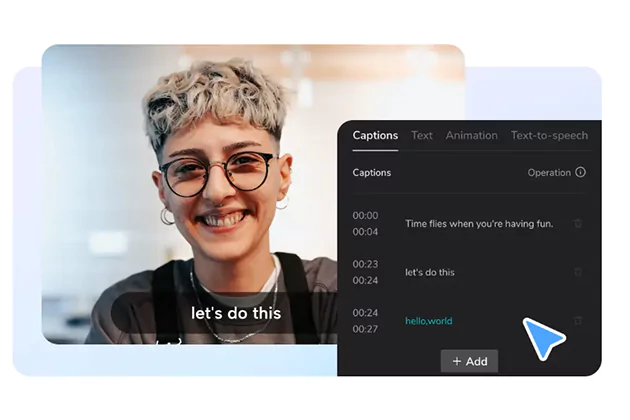
An auto caption generator by CapCut Desktop is a professional tool with an AI-based interface that creates video captions. Its AI algorithms read all the lyrics and voices in a video’s audio and convert it into captions. When you click on the auto caption’s “Create” button, the editor starts converting the video’s audio into text in seconds. Then, it gives you further options to customize these captions to add greater aesthetics to them. Having a look at the core features of this auto caption generator will help you better understand what it is about and how it benefits your content creation.

Core Features of Auto Caption Generator

This amazing AI-based auto caption generator amazes you through its following core features.

  • Diverse languages

It offers diverse languages that you can use in your captions. For example, suppose that you are making a video for the Chinese audience. So, choose the Chinese language and then click Create Captions. The auto caption generator will then create the captions in Chinese language with AI. Similarly, you can use any other language on the CapCut Desktop AI Caption Generator to generate captions for your videos. 

  • Understand audio of any language

In addition, it also understands the audio of any language and converts it into captions. For example, suppose that you have an Arabic video for which you want to generate the captions. When you import this video to the CapCut Desktop auto caption generator and command the editor to create captions, the editor will read the video’s audio with AI and convert it into accurate and precise captions. 

  • Allows caption customization

After the captions are created, it also allows you to make further customization to your video’s captions. You can set a beautiful font style to grab greater attention of the viewers. You can change the font size of the captions. To highlight some sentences or to put more focus on a word in the captions, you can make it a little bigger than the other words or change its color as well. You will see there many options to customize the captions of your video in a beautiful way. 

  • Allows adding manual captions

If something is missing in the video’s audio that you want to add to the captions, you can add it manually. This auto caption generator also allows you to edit the captions to add or remove any part of the caption you want. Even if your video contains some captions already, you can also delete them using the one-click option and add new captions with AI. 

  • No expertise required

In addition, there is no expertise required to use this expert auto caption generator tool. Even if a kid can use this tool effortlessly for creating captions for a poem video. So, you will absolutely face no issues while using this tool. 

  • 100% accurate results

Whether you create auto-captions using an auto caption generator or use other tools e.g. video background remover, you will enjoy 100% precise and accurate results. There will be no mistakes or issues with the captions generated by the auto caption generator. 

Step-by-Step Guide to Using CapCut Desktop Auto Caption Generator

Look at the following step-by-step guide to create impressive captions using the CapCut Desktop Auto Caption Generator.

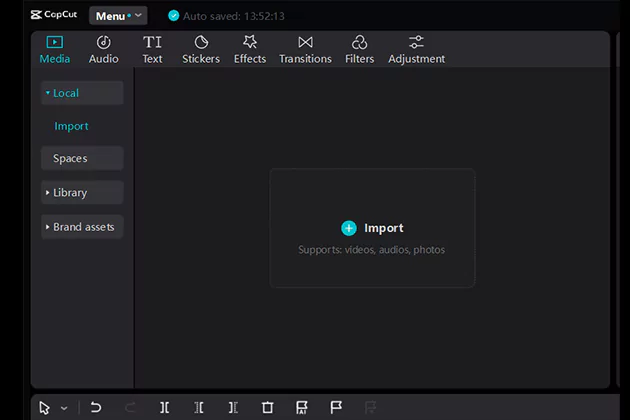
Step 1: Import Video

By using the import button on the CapCut Desktop main interface, you can import a video of your choice to the editor to create captions for it. 
Use Auto Caption Generator to Boost The Engagement of Your Videos

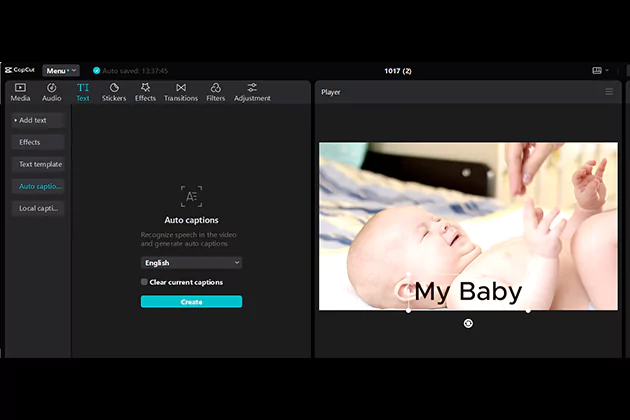
Step 2: Generate Auto Captions

Navigate to the text button at the top of this editor. Upon clicking on it, you will see further options from where you will click “Auto captions”. Choose any language and click the create button to create captions and edit them further if you want using other customization tools.
Use Auto Caption Generator to Boost The Engagement of Your Videos

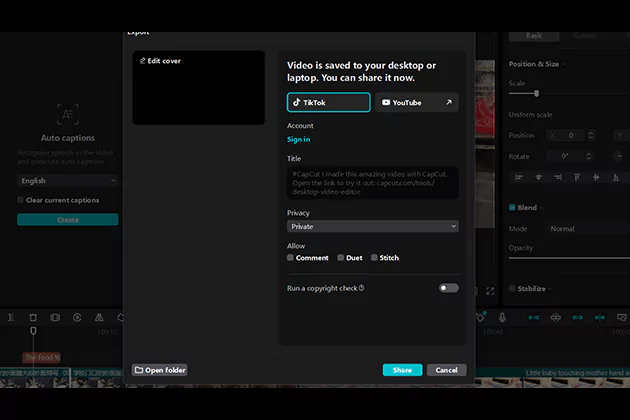
Step 3: Export and Share 

After making captions using a caption generator, don’t forget to export your watermark-free video with captions and share it with others. 
Use Auto Caption Generator to Boost The Engagement of Your Videos

Conclusion 

CapCut Desktop offers brilliantly professional features such as an auto caption generator which is AI-based and generates perfect results. So, use this free yet professional tool to create captions for your videos and make your videos get more attention and greater engagement.


The CEO Views October 22, 2024
Share this Article
Facebook Twitter LinkedIn Email Copy Link
Previous Article How to Implement an Incident Response Framework for Cybersecurity How to Implement an Incident Response Framework for Cybersecurity
Next Article Steps to Create a Game App for Android A Comprehensive Guide Steps to Create a Game App for Android: A Comprehensive Guide
What are Some Ways to Avoid Being Sued for Medical Negligence

What are Some Ways to Avoid Being Sued for Medical Negligence?

June 27, 2025
Interpreting ERP Migration Phases from On Premise to the Cloud
Cloud

Interpreting ERP Migration Phases from On-Premise to the Cloud

The CEO Views By The CEO Views March 7, 2024
JACK NATHAN HEALTH
ENTREPRENEUR VIEWS

JACK NATHAN HEALTH®: Provider of Primary Care Medical Clinics in Retail Market

The CEO Views By The CEO Views February 27, 2024
Essential Maintenance Tips for Laser Welders
Manufacturing

Essential Maintenance Tips for Laser Welders

The CEO Views By The CEO Views June 4, 2025
Diving Deep into How Drone Innovations Are Driving Efficiency Across Industries
Micro Blog

Diving Deep into How Drone Innovations Are Driving Efficiency Across Industries

The CEO Views By The CEO Views March 6, 2025

AI in Businesses: Finance, Healthcare, and Cybersecurity

May 7, 2026

Overcoming Talent Acquisition Challenges in High Growth Companies

May 7, 2026

Phone Number Validation: Importance in SMS Marketing

May 6, 2026

Revolutionary Digital Marketing Strategies for Sustainable Success

May 6, 2026

You Might Also Like

Overcoming Talent Acquisition Challenges in High Growth Companies
Micro Blog

Overcoming Talent Acquisition Challenges in High Growth Companies

3 Min Read
Phone validation process
Micro Blog

Phone Number Validation: Importance in SMS Marketing

10 Min Read
The Currency of Connection
Micro Blog

The Currency of Connection: Reengineering Value in the Experience Economy

5 Min Read
How Australian Business
Micro Blog

How Australian Businesses Can Navigate Complex Financing Decisions

10 Min Read
Small logos Small logos

© 2026 All rights reserved. The CEO Views

  • About Us
  • Privacy Policy
  • Advertise with us
  • Reprints and Permissions
  • Business Magazines
  • Contact
Reading: Use Auto Caption Generator to Boost The Engagement of Your Videos
Share

Removed from reading list

Undo
Welcome Back!

Sign in to your account

Lost your password?