

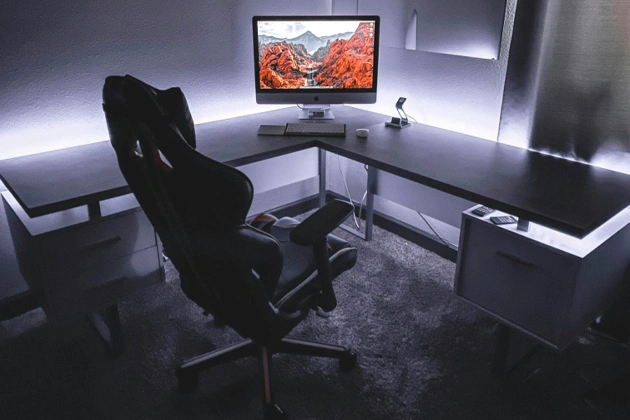
We compared 10 electric height-adjustable desk options for three monitor setups, and the Desky L Shape Standing Desk stood out as the best choice for Toronto executives. This sit-stand desk offers 59 inches of width per side, supports up to 440 lbs, features smart app control with Siri integration, and includes industry-leading cable management. Other strong contenders include the Branch Furniture L-Desk for budget buyers and the Progressive Desk Corner Ryzer for customization.
We evaluated 10 standing desk options available in Toronto and the GTA area. The Desky L-Shape Standing Desk outperformed competitors by combining smart technology, superior cable management, and a quiet triple-motor system that executives need in professional environments.
Adults in Canada aged 35–64 years spend an average of 4.0 hours per day sedentary at work, according to a study using data from the 2020 Canadian Community Health Survey, highlighting the need for ergonomic furniture to mitigate health risks from prolonged sitting [1].
Why Executives Need 3-Monitor Standing Desks
Leaders in Toronto’s financial district regularly manage multiple data streams, video conferences, and strategic documents simultaneously. Three monitor configurations let executives view spreadsheets, communication platforms, and research without constant window switching.
Toronto office trends reflect this shift toward flexible workspaces. The hybrid model means executives split time between corporate towers and home offices, requiring furniture that performs in both settings.
Essential Features for 3-Monitor Executive Desks
Weight capacity determines multi-monitor capability. Three 27-inch monitors with arms add 60 to 80 lbs before counting laptops and accessories, requiring desks rated for 250+ lbs minimum.
Stability at standing height matters for professional video calls. BIFMA-certified office furniture undergoes rigorous testing to prevent wobble that disrupts typing and causes monitor shake.
Cable management separates executive furniture from consumer products. Built-in channels and grommets hide power cables, USB connections, and display ports generated by three-monitor setups.
10 Recommended 3-Monitor Ergonomic Standing Desks for Executives in Toronto
1. Desky L Shape Standing Desk
The Desky L-Shape Triple Motor Standing Desk stands out for its combination of smart technology, superior cable management, and commercial-grade performance. This height-adjustable desk offers 59 inches of workspace on each side, creating an exceptional workspace for triple-monitor arrays.
The Desky standing desk features a robust triple-motor system that supports up to 440.9 lbs and offers an impressive height range of 23.6″ to 49.2″ for versatile ergonomic adjustments. It offers smart app control with Siri voice commands, memory presets for four positions, and industry-leading cable management that pairs seamlessly with optional 9-outlet power boards.
Certified to BIFMA X5.5 standards, it comes with a 10-year warranty and is available in multiple desktop finishes, including bestseller hardwood, bamboo, rubberwood, softwood, and laminate.
Pros:
- Purpose-designed cable channels eliminate desk clutter
- Siri voice control enables hands-free height adjustment
- Ultra-quiet motors suitable for video calls
- Sit/stand reminders via app improve ergonomic habits
- Heavy-duty steel frame ensures minimal wobble
- Hardwood desktop option provides premium aesthetics at competitive pricing
Cons:
- L-shape footprint requires adequate floor space
2. Branch Furniture L-Desk
Branch Furniture’s L-Desk offers affordability, with a 60-inch width and a fixed-height design, featuring basic cable management and optional shelving. It supports up to 360 lb of static load with a durable laminated MDF top and a powder-coated steel frame, backed by a 10-year warranty.
Pros:
- Budget-friendly
- Quick Canadian shipping
Cons:
- Single motor
- Basic features
3. Progressive Desk Corner Ryzer
Canadian manufacturing enables custom sizing. Triple motors support 330 lbs with a lifetime frame warranty and local service.
Pros:
- Custom dimensions
- Lifetime warranty
- Local support
Cons:
- Premium pricing
- Longer lead times
4. Vari L-Shape Corner Electric
Commercial-grade laminate surface with three whisper-quiet motors. BIFMA and GREENGUARD certified for corporate environments, supporting up to 200 lbs.
Pros:
- Commercial durability
- Environmental certifications
Cons:
- Laminate surface
- Higher Canadian shipping costs
5. EffyDesk The Grove L-Shape
EffyDesk The Grove L-Shape features a triple-motor system supporting up to 410 lbs, with premium wood-grain finishes such as oak and acacia butcher block for an executive aesthetic. This corner standing desk offers a spacious 71″ x 71″ footprint, 4 memory presets, and robust cable management, backed by a 20-year warranty with free shipping across Canada.
Pros:
- Premium finishes
- 20-year warranty
Cons:
- Limited Canada availability
6. Autonomous Desk 2 L-Shaped
Autonomous Desk 2 L-Shaped offers triple-motor stability with 400 lb lift capacity across its true 77″ x 64″ L-shaped configuration (77″ main + 29″ x 35″ return). This corner-optimized standing desk provides 4 memory presets, quiet operation, anti-collision safety, and reversible orientation for reliable triple-monitor executive performance.
Pros:
- True L-shape corner design
- Highest capacity (400 lbs)
- Affordable pricing
Cons:
- Limited height range (29.4″–48″)
- Service varies by region
7. Office Source OS Laminate L-Shape
Office Source OS Laminate L-Shaped Desk (71″W x 83″D) delivers commercial-grade laminate construction optimized for executive corner workstations. This spacious L-shape provides ample surface area for triple-monitor setups, integrated storage options, and scratch-resistant finishes suitable for professional Toronto office environments.
Pros:
- True commercial L-shape (71″W x 83″D)
- Durable laminate construction
- Storage integration
Cons:
- Fixed height (not adjustable)
- Quote-based pricing
8. MotionGrey Ergo Pro 2 L-Shape
MotionGrey Ergo Pro 2 L-Shape offers fast shipping from Canadian warehouses with a 176 lb dual-motor capacity. It features a 59″ x 39″ reversible configuration, child lock controls on the keypad, and memory presets for ergonomic convenience.
Pros:
- Fast Canada shipping
- Competitive pricing
Cons:
- Limited finishes
- Newer brand
- Noticeable difference in quality between other brands
9. WorkRite Fundamentals LX Electric Equal Corner
The WorkRite Fundamentals LX Electric Large Equal Corner delivers medical-grade engineering optimized for L-shaped workstations with dual-leg electric height adjustment (27.5″–47″ range). This 42″-90″W corner configuration supports up to 200 lbs with programmable controls, BIFMA certification, and GREENGUARD GOLD for healthcare environments.
Pros:
- True equal corner L-shape design
- Medical-grade certifications
- 10-year warranty
Cons:
- Premium pricing
- Professional assembly recommended
10. FlexiSpot E7L Pro
FlexiSpot E7L Pro offers mass-market appeal with its 330 lb triple-motor capacity for stable L-shaped setups. It offers configurations such as 63″ x 47.5″ or 76″ x 55″, built-in USB charging on the keypad, and smooth adjustments with anti-collision safety.
Pros:
- Wide availability
- Good value
Cons:
- Mid-tier stability
- Inconsistent service
Comparison Table: 10 Recommended 3-Monitor Ergonomic Standing Desks
| Desk Model | Motors | Capacity (lbs) | Dimensions (inches) | Key Features |
| 1. Desky Triple Motor L-Shape | Triple | 440.9 | 59×59 | Siri app, cable mgmt, presets |
| 2. Branch Furniture L-Desk | None | 360 (static) | 60×78 (fixed) | Basic cable, shelving |
| 3. Progressive Corner Ryzer | Triple | 330 | Custom | Custom sizing, local service |
| 4. Vari L-Shape Corner | Triple | 200 | 79.5×60 | GREENGUARD, 4 presets |
| 5. EffyDesk Grove L-Shape | Triple | 410 | 71×71 | Wood finishes, cable tray |
| 6. Autonomous Desk 2 L-Shaped | Triple | 400 | 77×64 | Corner design, 4 presets |
| 7. Office Source OS Laminate | None | N/A | 71×83 | Storage integration |
| 8. MotionGrey Ergo Pro 2 | Dual | 176 | 59×39 | Child lock, Canada shipping |
| 9. WorkRite Fundamentals LX | Dual | 200 | 42-90 corner | Medical-grade certs |
| 10. FlexiSpot E7L Pro | Triple | 330 | 63×47.5+ | USB charging, wide availability |
Proper 3-Monitor Setup Guidelines
- Top monitor edges should align with or sit slightly below eye level.
- Side monitors should be tilted inward by 10-15° to prevent neck strain.
- Keyboards should be at elbow height when the arms hang naturally.
- Anti-fatigue mats with 3/4-inch thickness extend comfortable standing time beyond 30 minutes on hard flooring.
- Position desks perpendicular to windows, never facing them.
- LED task lighting at 3000K to 4000K eliminates glare while supporting evening work.
L-Shaped vs Straight Desk Configurations
L-shaped configurations create distinct zones for focused work versus collaboration. Executives use one leg for monitors and the perpendicular section for meetings or document review.
Straight desks excel in compact spaces, fitting against walls while providing 70+ inches for triple monitors. Space planning in Toronto offices must account for the premium cost of square footage.
Who Benefits From Triple Monitor Standing Desks
Finance professionals analyze markets, news feeds, and analytics across separate displays. Tech CTOs review code, monitor dashboards, and team communications simultaneously.
Remote executives managing global teams often rely on video conferencing tools; 52% of fully remote leaders spend 3+ hours daily in virtual meetings on secondary displays while multitasking [2].
Final Thoughts
The Desky Standing Desk offers optimal value for Toronto executives seeking three-monitor capability. Its smart app controls, integrated cable management, and quiet operation justify premium positioning while delivering measurable ergonomic benefits.
Long-term health considerations outweigh short-term budget constraints, making quality standing desks essential investments in sustained executive performance.
FAQs About 3-Monitor Ergonomic Standing Desks
What is the ideal desk width for three monitors?
Executives should aim for 72 to 78 inches for three 24-inch monitors, or 80+ inches for 27-inch displays. L-shaped desks provide this width along their longer leg while adding perpendicular workspace.
Are monitor arms better than desk stands?
Monitor arms free up valuable desk surface and provide superior ergonomic adjustability. Arms let executives pull screens to optimal viewing distance and adjust heights independently, which fixed stands cannot achieve.
How much weight should a standing desk support?
Quality triple-monitor standing desks should handle 250-300 lbs. This capacity accommodates three monitors with arms, laptops, docking stations, and accessories while maintaining stability.
Do standing desks wobble with three monitors?
BIFMA-certified standing desks with dual motor systems minimize wobble through balanced lifting and rigid construction. The Desky L-Shape Sit-Stand Desk and similar premium models remain stable even at maximum height with a full monitor load.
Are these desks suitable for home and corporate offices?
Modern triple-monitor standing desks work equally well in home-office configurations and corporate environments. Features such as cable management and premium finishes ensure a professional appearance in any setting.
Reference:
- Saunders, T. J., Gibbs, R., Gierach, M., & Giangregorio, L. M. (2024). Sedentary time at school and work in Canada. Applied Physiology, Nutrition, and Metabolism, 49(4), 413–422. https://pubmed.ncbi.nlm.nih.gov/38277123/
- SQ Magazine. (2025, October 2). Video conferencing statistics 2026: Boost your business edge. https://sqmagazine.co.uk/video-conferencing-statistics/